Problem
Turning a topic into a visual briefing normally means doing every step by hand: framing the topic, structuring it into a sequence of slides, drafting copy for each one, formatting it consistently, rendering it to an image, and reviewing the result — one slide at a time, ten times over.
Intended user
Designed for a user who needs to turn a topic into a consistent visual briefing without manually drafting, structuring, formatting, and rendering every slide from scratch. No real marketing or communications team has adopted this — it's a working demonstration of the pipeline, run 36 times on real topics during development.
Workflow before the tool
No measured time savings are claimed here. Qualitatively: a user would research the topic, draft ten slides' worth of copy, decide on sequencing and emphasis, format each slide by hand or in a design tool, export each one, and assemble a set for review — all as separate manual steps.
What I built
- A CLI entry point (
scripts/index.js) supporting generate+render (default), generate-only, and a--rendercommand that re-renders an existing valid JSON file without calling Claude again. - A Claude API call (
scripts/generator.js, modelclaude-sonnet-4-6) that produces a 10-slide JSON structure, plus optional audience/tone/language/key-point controls. - Explicit deck-schema validation (
scripts/schema.js) — exact slide count, slide types by position, required fields, length limits — and one bounded correction retry when the response is schema-invalid, with the validation errors fed back as a targeted correction prompt. - Three distinct, distinguishable failure modes with their own exit codes: a Claude API error, unparseable JSON, and a schema-invalid deck — none of them an uncaught crash.
- A rendering pipeline (
scripts/renderer.js) that stages a render in a temporary directory, validates it completely, and only then swaps it into the real output directory — so a failed or partial render can never corrupt a prior successful one. This also fixed a real bug: Puppeteer's browser previously wasn't closed on a mid-render error, leaking a headless process. - Run metadata (
run-metadata.json) and a human-review checklist printed after every successful run. - 33 automated tests (Node's built-in test runner) covering schema validation, generation error handling via an injectable fake client, CLI argument parsing, and real Puppeteer rendering — all offline, no API key required.
- One representative example run committed (
output/microplastics-everywhere-what-we-know/); 35 other example decks generated during development were pruned from the tracked tree to keep the repository focused.
How it works
Topic
Free-text CLI argument, e.g. a one-line subject.
Claude API
Drafts a 10-slide JSON structure in one call.
HTML/CSS + Puppeteer
Each slide rendered to a 1080×1080 PNG.
Human review
PNG deck + thumbnail grid reviewed before any use.
Where Claude acts, where deterministic logic acts
Exactly one step in the whole pipeline touches a language model per run — drafting the JSON. Every step after that (validating its shape, choosing which of the 3 templates to render, producing the PNGs, assembling the grid) is plain deterministic code, which is why --render can redo all of it from a saved JSON file with no API call and no cost.
Inputs and outputs
CLI command:
npm install
export ANTHROPIC_API_KEY=...
npm start -- "Microplastics are everywhere"
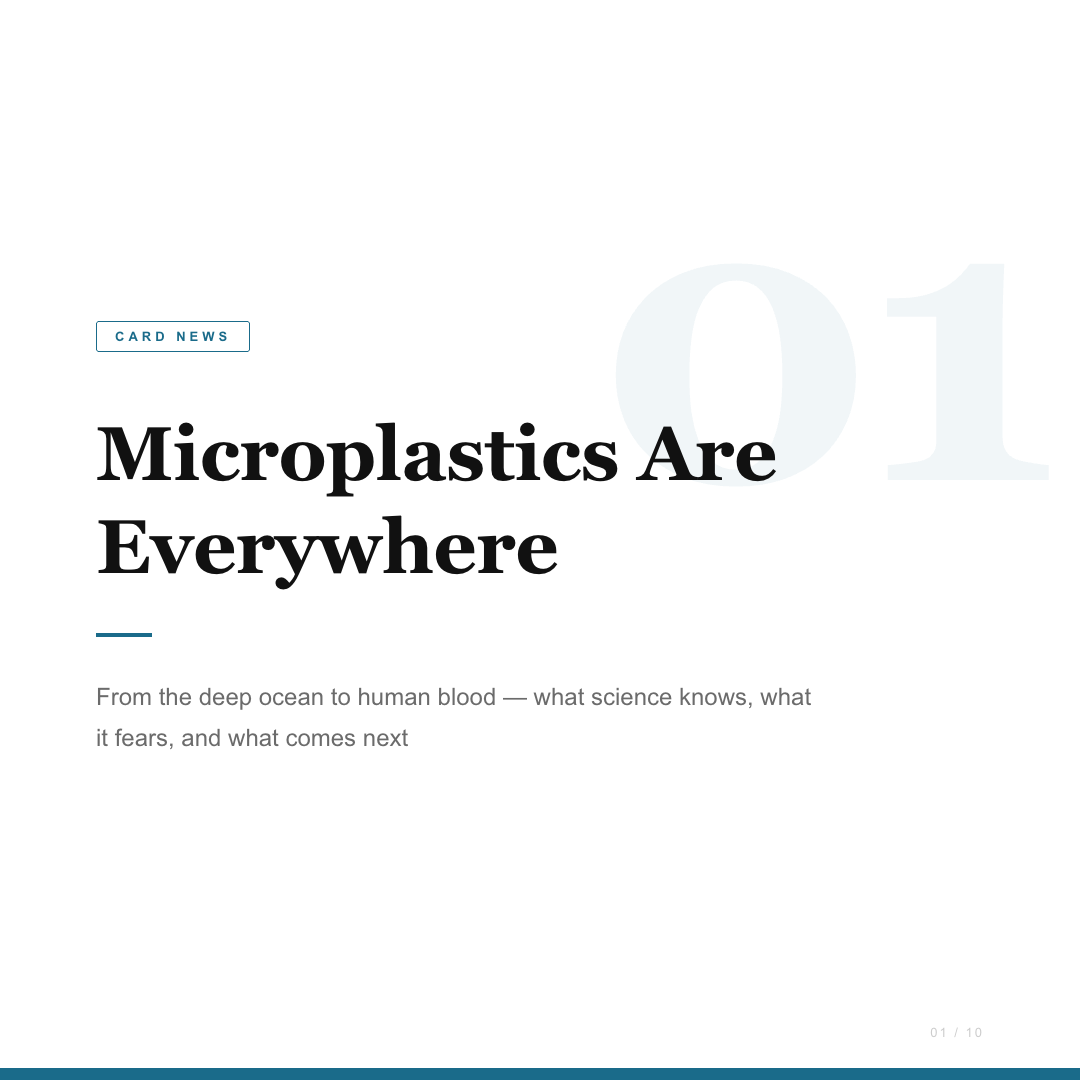
Real generated output (output/microplastics-everywhere-what-we-know/cards.json, first two of ten slides):
{
  "title": "Microplastics Are Everywhere",
  "theme_color": "#1A6B8A",
  "slides": [
    {
      "slide_number": 1,
      "type": "title",
      "heading": "Microplastics Are Everywhere",
      "body": "From the deep ocean to human blood — what science
               knows, what it fears, and what comes next"
    },
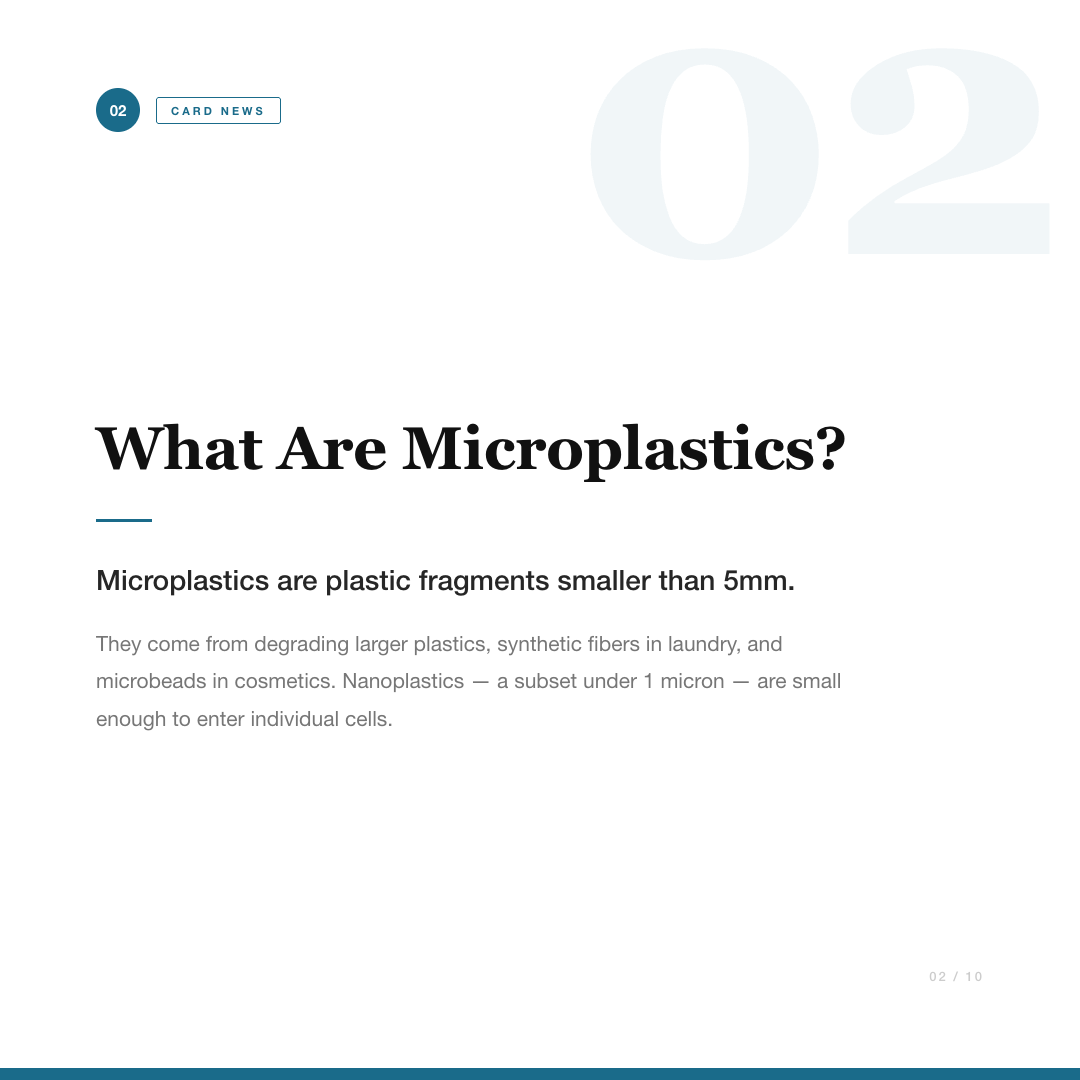
    {
      "slide_number": 2,
      "type": "content",
      "heading": "What Are Microplastics?",
      "body": "Microplastics are plastic fragments smaller than 5mm.
               They come from degrading larger plastics, synthetic
               fibers in laundry, and microbeads in cosmetics."
    }
    // ... 8 more slides
  ]
}
The corresponding rendered slides:
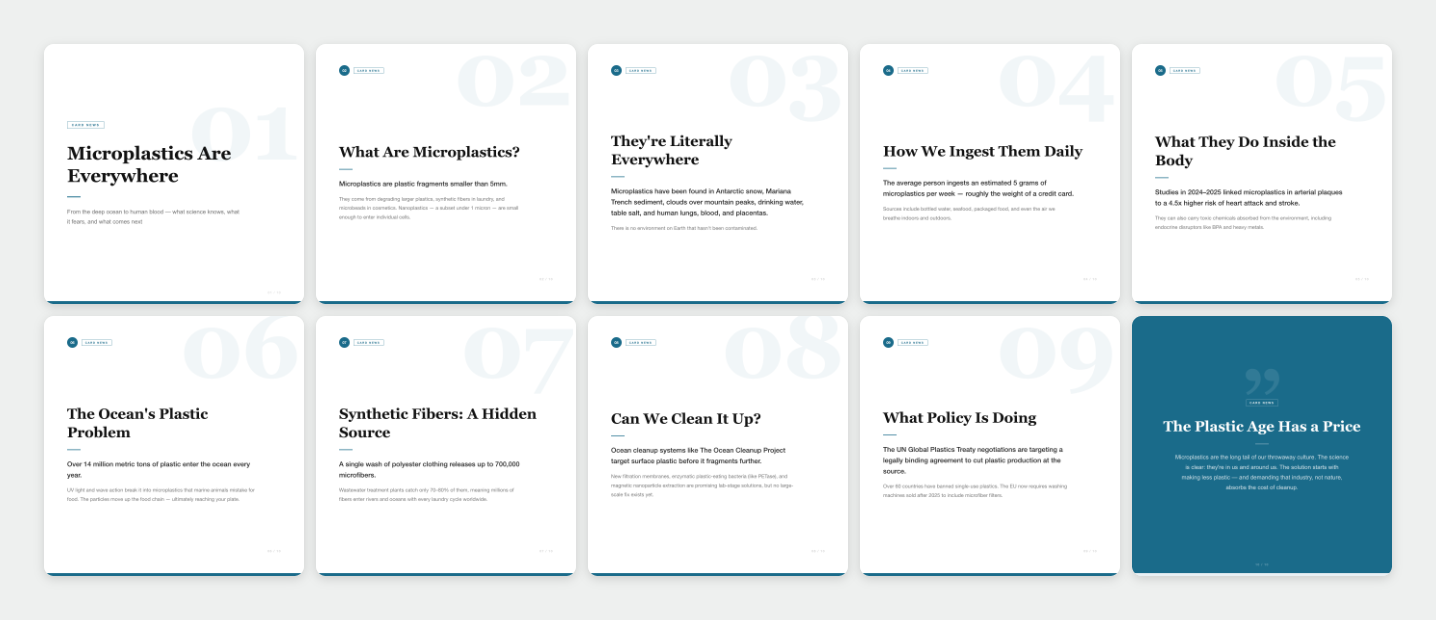
diary-shot.png) — this is the fast-review artifact a user would look at first.Tech stack
- Node.js (ESM)
- @anthropic-ai/sdk
- Claude Sonnet 4.6
- Puppeteer
- HTML/CSS templates
How output correctness is checked (and what isn't)
- Deck schema validation (
scripts/schema.js) rejects: wrong slide count, an unsupported or out-of-position slidetype, missing/emptyheadingorbody, headings over 200 characters, bodies over 800 characters, an invalidtheme_color, and any unexpected field. - A schema-invalid response gets exactly one correction turn — the model is shown only the specific validation errors — never an unbounded retry loop.
- Rendering validates its own output before it's kept: exact file count, no empty PNGs, no duplicates, a non-empty thumbnail grid — verified by a test that forces a mid-render failure and confirms a prior successful render is left byte-identical afterward.
- None of this validates facts — schema and rendering validation confirm the deck's shape and files are correct, not that any claim in the slide copy is true. That remains entirely a human-review responsibility.
Design decisions
- Model output is constrained to JSON, not free text, because the renderer needs a stable shape to build HTML from.
- JSON is saved before rendering so a deck is inspectable and re-renderable (
--render) without a Claude call, and so a rendering failure never loses the generated content. - Rendering stages to a temporary directory before swapping in: during implementation, a render failing partway through would leave a directory with fewer files than a previous successful run, silently corrupting it — staging and validating before the swap fixes that.
- One bounded retry, not an unlimited loop: an open-ended retry trades a clear failure for an unclear one.
- One representative sample deck is committed rather than many, to keep the repository focused rather than filled with bulk-generated filler.
CLAUDE.md previously described the slide templates as having a "gradient background, centered white text" — stale language predating an earlier redesign. The templates actually in templates/styles.css, and the slides rendered above, use a solid white background with near-black heading text (title/content slides) and a solid theme-color background (closing slide only). Both the README and this page now describe what's actually rendered.Adoption & documentation
Quick start:
npm install
export ANTHROPIC_API_KEY=...
npm test                              # 33 tests, no API key needed
npm start -- "<topic>"
npm start -- --render output/microplastics-everywhere-what-we-know/cards.json
Each run writes output/<topic-slug>/ containing cards.json, slide-01.png through slide-10.png, diary-shot.png, and run-metadata.json — shown above for one real example. The --render command re-renders an existing valid JSON file at no API cost.
Responsible use
Quoted directly from the project's own README:
- Drafts only. Slide copy produced by the Claude API is a starting point for a human author to edit. Do not publish a deck without reading every line.
- No proprietary or confidential topics. The topic you pass becomes part of the prompt sent to the API. Do not pass non-public material.
- Source-check every factual claim. The model can produce confident, plausible, and incorrect statements. Verify dates, statistics, and names against authoritative sources before publishing.
- Be explicit that AI was used. When publishing a deck, label it as AI-assisted and credit the human author who reviewed and edited it.
- Rate limits and cost. Each run makes one API call to a chat model plus 10 Puppeteer renders.
Limitations
- No automated fact-checking of any kind; every factual claim in generated copy depends entirely on human source-checking.
- Only three fixed visual layouts (title / content / closing) — customization requires editing the CSS templates directly.
- Requires an Anthropic API key and incurs API and rendering cost per generation run (
--renderhas no API cost); no hosted demo exists. - The correction retry is bounded to one attempt — a response that's schema-invalid twice in a row fails the run rather than retrying further.
- The live Claude generation path was not executed against the real API during this development pass — no API key was available. Verification instead used the real rendering pipeline against a previously-committed, real Claude-generated example, plus 33 tests using an injectable fake client for generation and real Puppeteer for rendering. This is not the same as a live generation run.
What I'd improve next
- Add citation or source-linking support so factual claims are easier to verify.
- Add more visual templates beyond the current three layouts.
- Support an editable export format (e.g. layered assets) instead of flattened PNGs only.
- Execute a live generation run against the real Claude API once a key is available, and commit that run's artifacts labeled explicitly as a live sample.